Creative Ways to Hide Cords on a Wall-Mounted TV

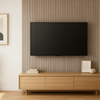
No one wants that dangly spider look of a bunch of cables hanging down from their TV. When hiding your TV cords, take the time to make sure your electronics are protected from power surges. Don’t ruin your expensive gear! Learn why a TV surge protector is essential and how to manage the cords on a wall-mounted TV.
Why surge protection matters
Power surges happen for many reasons: lightning strikes, downed power lines, faulty wiring or appliances switching on and off. Even small spikes degrade sensitive components over time.
A single large surge can fry a television, soundbar, game console and/or streaming device instantly — and of course, replacing that equipment is both costly and frustrating. Surge protectors absorb excess voltage and divert it away from your devices, acting like sacrificial barriers. But not all surge protectors are equal. Pay attention to:
-
Joule rating: This number indicates how much energy the protector can absorb. Higher is better. Aim for at least 2,000 joules for a home theater. Surge protectors wear out as they absorb surges; once their capacity is depleted, they no longer protect and should be replaced.
-
Response time: Surge protectors should respond within nanoseconds. Metal Oxide Varistor (MOV) technology is common. Faster response times mean your equipment experiences less of the surge.
-
Number of outlets and ports: Count how many devices you need to plug in. Some surge bars include coaxial, telephone or ethernet protection, which is important if those cables are connected to your equipment.
-
Indicator lights: Good protectors have lights or alarms that show whether the unit is still protecting or needs replacement.
-
Warranty: Some manufacturers offer connected equipment warranties, promising to reimburse you if their protector fails.
🤔 Pro tip
Always plug the surge protector directly into the wall; don’t daisy-chain protectors and extension cords. It’s a fire hazard due to overheating and electrical overload, plus doing so usually voids any product warranty.
Planning your cable runs
TV cable management begins at the planning stage. Think about where your devices will sit and how the cables will reach them. Consider:
-
Cable length: Measure the distance from the TV to your media devices (streaming box, game console, etc.) and from those devices to the power source. It’s better to have a bit of slack than to stretch cables too tightly, but avoid too much slack, which can lead to unsightly coils.
-
In-wall vs. surface: Hiding TV wires in the wall gives the cleanest look, but involves cutting drywall. If you don’t want to deal with that, try surface raceways — plastic or metal channels that stick to the wall’s surface and can be painted to match your walls. Use an in-raceway power kit to safely run power and low-voltage cables together.
-
Future expansion: Plan for additional devices by running extra cables or conduit. Adding an HDMI switch or soundbar later is easier if you’ve left room.
-
Cable quality: Use certified HDMI cables that support the resolution and refresh rate you need (e.g., 4K at 60Hz). For in-wall runs, choose fire-resistant CL2- or CL3-rated cables.
💡 Bright idea
Sketch your cable routes on paper. Mark locations for outlets, junction boxes and any holes you’ll cut.
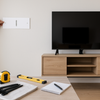
Hiding TV wires in the wall in 7 steps
-
Turn off power: Flip the breaker to the outlet you’ll be working on. Confirm with a voltage tester.
-
Mark cutouts: Trace the outline of your low-voltage brackets or recessed boxes on the wall behind the TV and near the outlet. Ensure there are no studs, pipes or existing electrical lines where you plan to cut.
-
Cut holes: Use a drywall saw or oscillating tool to cut out the holes. Keep the edges clean.
-
Install brackets: Insert the low-voltage mounting brackets into the holes and tighten the screws to clamp them to the drywall.
-
Fish the cables: Feed fish tape or a cable puller from the upper hole to the lower. Attach your cables to the fish tape and pull them through. If running power, use an in-wall power kit for TVs — these have a pre-wired cable connecting the two boxes.
-
Terminate and secure: Connect HDMI, coax and ethernet cables to your devices. Tuck excess cable into the wall. Screw wall plates over the holes for a finished look.
-
Connect and test: Restore power and connect your equipment. Test video and audio to ensure nothing is pinched or damaged. If you installed an in-wall kit, check the indicator lights.
Read >> How to Hide the Wires From the TV on Your Wall
Non-drilling cable management options
If you prefer not to open the wall, there are other ways to keep things neat. As mentioned earlier, raceways hide cables and can be painted to match your wall. Choose one with a hinged cover for easy access. Additional options include:
-
Cable sleeves: Fabric or neoprene sleeves that wrap multiple cables together. They’re great for bundling cords behind a stand or desk.
-
Cord clips and ties: Adhesive clips guide cords along the back of furniture. Velcro ties keep cables bundled and prevent tangles.
-
Power bridges: A surface-mount power kit lets you run a power cable along the wall inside a raceway, connecting a recessed box behind the TV to an outlet below.
These solutions are renter-friendly and don’t require a lot of tools. They may be visible, but they still look neater than loose cables.
Fire safety considerations
Whenever you run electrical cables, follow these safety guidelines:
-
Use proper cable types: Only run CL2- or CL3-rated power cables behind walls. Standard power cords are not rated for in-wall use and can overheat or catch fire.
-
Avoid overloading circuits: High-wattage devices like amplifiers or space heaters should not share a circuit with your TV. Overloaded circuits trip breakers and overheat wires.
-
Maintain clearances: In-wall components need space to dissipate heat. Don’t stuff power bricks behind the TV where they touch insulation or drywall.
-
Inspect connections: Loose outlet screws or partially inserted plugs create resistance and heat. Ensure all connections are tight.
-
Follow codes: Local building codes dictate how power and low-voltage cables must be installed.
A safe and reliable home theater requires both surge protection and good cable management. When in doubt, hire a licensed electrician.
Get more great content related to creating an amazing home theater experience on the MantelMount blog.
Leave a comment
Please note, comments must be approved before they are published.